
If I’m planning battery backup for a public facility, I should start with one question: what must stay on, and for how long? That answer drives battery size, control setup, solar tie-in, generator use, site layout, and budget.
Here’s the short version:
- I split loads into critical, must-keep-running support loads, and loads that can stay off
- I set an outage target based on local outage history, not averages
- I size storage from 12 to 24 months of interval load data
- I add room for inverter losses, depth-of-discharge limits, temperature effects, and future load growth
- I treat solar as a daytime runtime extender, not a full backup source
- I use batteries and generators together so the battery covers instant ride-through and short outages, while the generator covers longer events
- I check code, fire review, interconnection, space, structural limits, and utility coordination early
A few numbers from the article stand out. A simple starting point is kW × hours = kWh, so 300 kW for 8 hours = 2,400 kWh before system losses and reserve margins. Installed costs often fall between $250 and $580 per kWh, and NREL’s 2025 projection for a 4-hour system is about $295 to $350 per kWh in 2024 dollars. In storm-prone areas, many sites plan around 48 to 72 hours for top-priority loads.
| Decision area | What I focus on |
|---|---|
| Load priority | What cannot go down first |
| Outage target | Short, 24–72 hours, or multi-day events |
| Battery size | Actual meter data, not rough guesses |
| Solar role | Daytime support only |
| Generator role | Longer outages and fuel-backed support |
| Controls | Islanding, load shedding, dispatch order |
| Site review | Fire code, utility, footprint, tie-in points |
The main idea is simple: pick the battery around the load plan, not the other way around. That keeps the project tighter, clearer, and easier to phase.
Define Critical Loads and Set Outage Goals
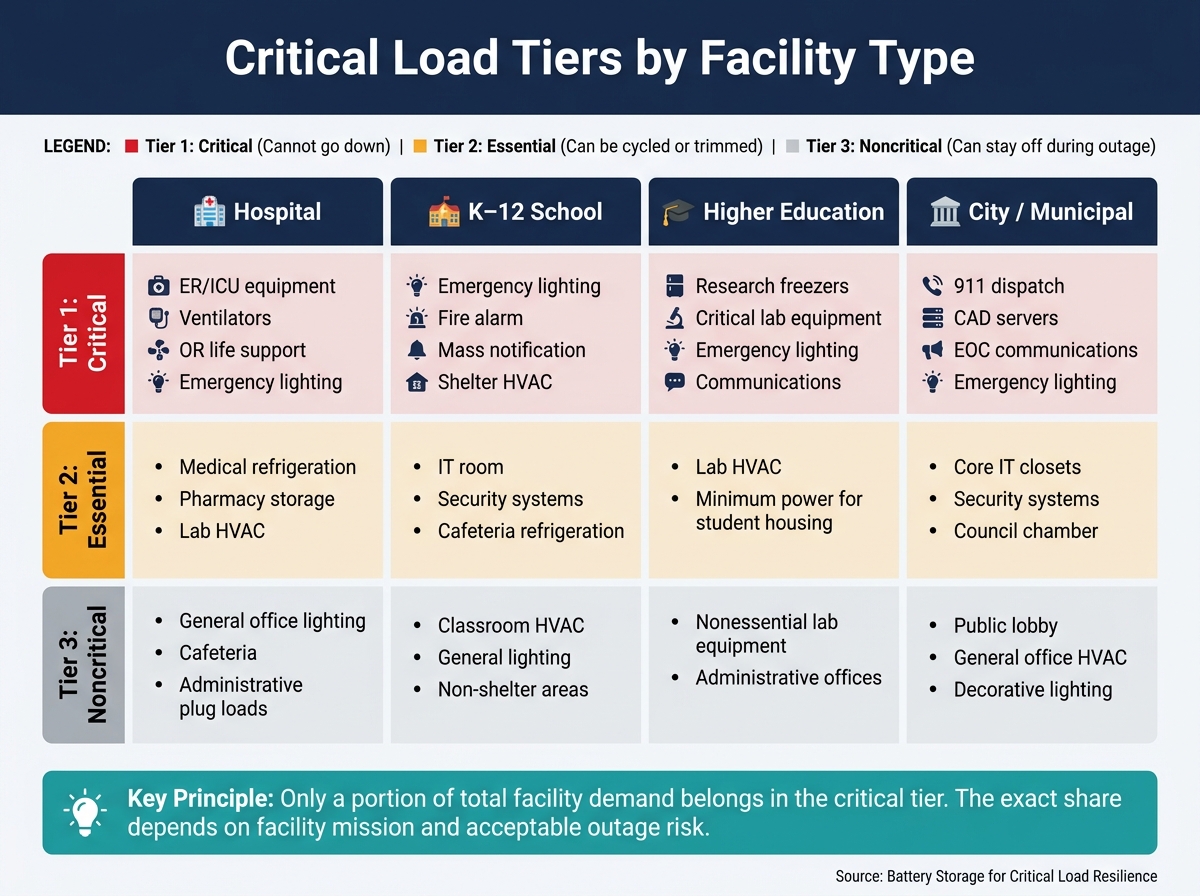
Battery Storage Sizing Guide: Critical Load Tiers by Facility Type
Start by splitting facility loads into three groups: critical, essential, and noncritical. This sounds simple, but it drives almost every choice that comes next.
Back up too much load, and the system gets expensive fast. Back up the wrong load, and the facility is still exposed when the power goes out. That’s why the load list should come first. It becomes the basis for sizing, controls, and how the battery operates during an outage.
Rank Loads by Facility Mission and Cost of Downtime
Sort loads into three tiers: critical, essential, and noncritical.
Critical loads cannot go down without putting life safety, emergency response, or major revenue at risk. Essential loads support continuity, but they can often be cycled or trimmed for a period of time without direct harm. Noncritical loads, like decorative lighting, plug loads in non-emergency offices, and HVAC in nonessential zones, can usually stay off for long stretches without lasting damage.
Only part of a facility’s total demand belongs in the critical tier. The exact share depends on the facility’s mission and how much outage risk it can accept.
For K–12 schools, that critical share is usually much smaller. It often centers on emergency lighting, fire alarms, mass notification, basic IT, and shelter areas such as gymnasiums. City facilities like 911 dispatch centers and emergency operations centers usually keep the critical tier tight, focusing on call-taking systems, CAD servers, radio and communications equipment, and the HVAC that keeps those rooms running.
| Facility Type | Tier 1 – Critical | Tier 2 – Essential | Tier 3 – Noncritical |
|---|---|---|---|
| Hospital | ER/ICU equipment, ventilators, OR life support, emergency lighting | Medical refrigeration, pharmacy storage, lab HVAC | General office lighting, cafeteria, administrative plug loads |
| K–12 School | Emergency lighting, fire alarm, mass notification, shelter HVAC | IT room, security systems, cafeteria refrigeration | Classroom HVAC, general lighting, non-shelter areas |
| Higher Education | Research freezers, critical lab equipment, emergency lighting, communications | Lab HVAC, minimum power for student housing | Nonessential lab equipment, administrative offices |
| City/Municipal | 911 dispatch, CAD servers, EOC communications, emergency lighting | Core IT closets, security systems, council chamber | Public lobby, general office HVAC, decorative lighting |
This tiering sets battery size. It also draws the battery boundary for the rest of the project.
Set Backup Duration Targets Based on Real Outage Scenarios
After the loads are ranked, set the minimum outage window the battery needs to cover. FEMA groups outage planning into three windows: short-duration (under 24 hours), intermediate-duration (24–72 hours), and long-duration (72 hours or more).[3] The right target depends on local hazard history, utility performance, and whether the facility has a formal emergency role.
The target should match the longest outage the facility is likely to ride through, not the average one. That distinction matters. A site may have short outages most of the year but still face a multi-day event during a storm, wildfire, or grid failure.
In Gulf Coast communities and other hurricane-prone areas, multi-day outages after major storms are well documented. In those places, facilities often plan for 48 to 72 hours of critical load support. A 72-hour window is a common baseline for hospitals and resilience hubs, and one hospital microgrid study sustained roughly 72 hours of self-supply.[4]
In places with a more stable grid and lower weather risk, an 8- to 24-hour target for critical loads is often enough, with generators covering longer events. The main point is to tie the duration target to actual outage records and local emergency management plans, not guesswork.
Hospitals, schools, and city facilities won’t land on the same number, because their staffing, mission, and recovery role are different. A hospital with trained 24/7 staff and a steady diesel supply can lean on generators for multi-day support, while using batteries to handle transfer periods and cut generator run time. A smaller school with limited after-hours staff may need a shorter, more automated battery-backed window. And if fuel delivery could fail during a regional disaster, longer battery duration plus solar recharge becomes much more useful, especially for communications, lighting, and IT loads that need to stay live.
Once the load list and outage target are in place, the battery can be sized and paired with solar or backup generation as part of a broader building systems integration for public facilities.
sbb-itb-034f8e1
Size Battery Storage and Plan How It Works with Solar and Backup Power
Use Load Data to Estimate Required Battery Capacity
Once you’ve set your critical-load tiers and outage target, the next move is to size the battery using actual demand data.
Start with a simple calculation: multiply the simultaneous critical load in kW by the number of outage hours. That gives you a starting point for usable battery energy. So if you need to back up 300 kW for 8 hours, the base estimate is 2,400 kWh.
From there, adjust upward to reflect how systems work in the field. Account for:
- Inverter losses, with efficiency usually in the 92% to 97% range
- Depth-of-discharge limits, often around 80% to 90%
- A temperature margin of 10% to 25% for outdoor systems
- A future growth buffer of 10% to 20% for load changes [5][7]
This is where many projects get sharper. Instead of sizing from rough guesses, use 12 to 24 months of interval load data, ideally 15-minute or hourly utility meter data. That helps tie the battery size to how the building actually behaves. Model at least two cases: a peak-weather outage and a shoulder-season outage. Then size to the larger result [5][7].
That battery number means a lot more when solar and generators each have a clear job.
Evaluate Solar-Plus-Storage and Generator Coordination
Solar can stretch battery runtime during daytime outages. That’s useful. But it doesn’t do much overnight, and its output can drop hard during cloudy weather or in winter. So it’s smarter to treat PV as a runtime extender, not a stand-alone backup source [8][6].
Batteries also work well with standby generators when the division of labor is clear. They handle ride-through by supporting critical loads right away during the seconds or minutes a generator needs to start and sync. They can also cover short outages of under 30 to 60 minutes without firing up the generator at all. In hospitals and large campuses, batteries may also help restart switchgear and controls after a full shutdown [8][9].
The numbers here are worth a look.
A hospital microgrid case study found that a coordinated PV, battery, and diesel generator system could sustain an average 72-hour outage, improving resilience by 24 hours over the baseline while reducing utility cost by $147,354.
Another study reached a similar point from a cost angle:
A separate study found optimized PV + battery + diesel microgrids delivered lifecycle savings of 9% to 14.2% across outage scenarios lasting 7 to 24 hours. [2][1]
After you’ve set the operating role, the next question is pretty practical: what does each size option cost up front, and what will it cost later?
Compare Capacity Options Against Budget and Lifecycle Cost
Installed battery storage costs for commercial and public-sector projects usually land between $250 and $580/kWh, depending on system size, chemistry, duration, and site complexity. NREL’s 2025 projection for a 4-hour system is about $295 to $350/kWh in 2024 dollars. Costs go up when the project needs longer durations, microgrid controls, fire-rated enclosures, or interconnection upgrades [11][12][10].
| Factor | Smaller Targeted System | Larger Campus Resilience System |
|---|---|---|
| Upfront cost | Often fits within an annual capital budget | Typically requires bond funding or a multi-year capital plan |
| Outage coverage | Short outages for selected critical loads | Longer outages across multiple buildings or campuses |
| Site impact | Smaller footprint; fewer electrical upgrades | More space, permitting, and interconnection work |
| Backup role | Supports ride-through, short outages, and generator coordination | Supports hybrid dispatch, generator coordination, and solar capture |
| Replacement planning | Easier to phase in and expand incrementally | Requires deliberate lifecycle planning and future augmentation |
Phasing the investment can make the budget side easier to handle. A common path is to start with a smaller system that covers the highest-priority loads, then expand later through bond funding as resilience goals grow. That way, sizing decisions reflect lifecycle cost, not just the installed price.
With capacity and backup roles defined, the next step is controls, safety, and site layout.
Design Controls, Safety, and Site Layout for Public Facilities
After sizing and budgeting, controls, safety, and site layout decide whether a battery system can actually keep critical loads running when the grid goes down.
Set Up Controls for Islanding, Load Shedding, and Battery Dispatch
When the grid drops, the controls need to do three things without delay: island the facility, switch the facility to battery power, and shed nonessential load automatically. A central energy controller manages the battery, solar, and onsite generation so those systems work together instead of fighting each other.
The sequence matters. Tier 1 loads should stay on first, while tier 2 and tier 3 loads are shed if the event lasts longer or power gets tight. Historical load data can also help shape dispatch plans before an outage. That gives operators a better sense of what the battery may need to support, and for how long.
Those operating choices also have to match code, fire protection, and emergency response rules.
Meet Fire Safety, Electrical Code, and Emergency Planning Requirements
Battery storage in occupied public facilities must comply with OSHA, state fire and electrical codes, utility interconnection rules, and emergency planning requirements. In plain terms, safety review is not a box to check at the end. It directly affects whether the battery can carry critical loads during an outage.
That’s why it helps to bring in building safety staff, emergency management teams, and the utility early during design review. If those groups weigh in late, the project can run into avoidable delays, layout changes, or operating limits.
After compliance, the next hurdle is placement, interconnection, and construction feasibility.
Work Through Space, Interconnection, and Construction Limits
Physical site conditions often decide where battery equipment can go. A system can be sized correctly on paper and still run into trouble because of layout, access, or interconnection limits. It’s a bit like planning furniture for a room: the pieces may fit by measurement, but doors, hallways, and wall outlets can still wreck the plan.
Underground utilities are a common issue. They can force equipment rerouting, relocation, or protective construction to keep the site safe and code-compliant. Battery systems also often need to connect to existing service equipment, solar arrays, and standby generation, so the project has to be planned around those tie-in points.
Structural engineering is also needed for roof-mounted systems and other locations where added weight could affect the building.
Build a Practical Resilience Roadmap
Apply the Workflow by Facility Type
Once you’ve set load priority, outage duration, controls, and site limits, the next step is to turn that work into a roadmap for the specific facility in front of you.
The workflow stays the same across public facilities. What changes is the mission. A water plant, a public safety site, and an operations center may all use the same planning process, but their load mix, outage target, and control setup won’t look the same. That’s why it helps to start with load priority and then size storage, controls, and safety around the site itself.
Conclusion: Start with Critical Loads, Then Design Around Real Constraints
Every decision in this guide comes back to one starting point: knowing which loads cannot go down and how long they need to stay on.
That one piece of clarity shapes storage sizing, solar tie-in logic, control sequences, and budget scope. Without it, projects often drift in one of two bad directions. They either oversize equipment and spend more than needed, or they leave the most important systems exposed.
That’s where early planning earns its keep. It lines up storage, generation, controls, and procurement before design choices get locked in.
The Inland Empire Utilities Agency (IEUA) is a good example. When the agency added a 1 MWh battery system at its Regional Water Recycling Plant No. 5, the project coordinated storage with a 1 MW solar array and a 1.5 MW biogas cogeneration engine, with no capital outlay from IEUA. [13]
Public facilities using this guide should follow that same path: start with critical loads, set outage goals that match actual needs, size systems using real data, coordinate with on-site generation, and bring safety and site review into the design process from the start.
FAQs
How do I decide which loads are truly critical?
Start by figuring out which systems must keep running during a grid outage. The goal is simple: separate must-have loads from everything else.
Prioritize loads based on:
- safety and life-critical services
- core building operations
- occupancy patterns
That usually means fire and life safety systems, emergency lighting, and certain medical or laboratory equipment. You’ll also want to review the code rules that apply, such as NEC Article 517, and look closely at infrastructure needs and building automation systems so essential operations have steady, reliable power.
How much battery capacity should I add beyond the basic kW × hours estimate?
Go beyond a simple kW × hours estimate. Use modeling that matches your site’s actual load profile, solar output, outage scenarios, utility rates, and resilience goals.
It also helps to look at microgrid integration, longer outage needs, and whether the site can island from the grid. E3 can help evaluate these factors for both normal and emergency operations.
When should a public facility pair batteries with solar or a generator?
Public facilities that need steady power for critical loads during long grid outages should pair battery storage with solar and a generator.
Together, these systems can work like a microgrid. Solar charges the battery during the day, and the generator steps in when the battery charge drops too low.
That mix doesn’t just help during emergencies. It can also help day to day by:
- cutting peak demand through peak shaving
- making better use of on-site renewable energy
- shifting solar power into high-demand evening hours
In plain terms, you’re not letting daytime solar go to waste. You’re storing it and using it when the building needs it most.