
If I had to sum this up in one line: public facilities should use certificate-based device login where possible, keep one device inventory, rotate credentials every 1–3 years, revoke them fast when risk shows up, and limit what each person and device can reach.
That’s the core plan for schools, hospitals, water systems, and city buildings. The article makes a simple point: device identity is not a one-time setup. It starts at purchase, continues through onboarding, and ends only when the device is retired.
Here’s what I’d want you to know right away:
- Certificates are usually the top choice for newer IoT devices, especially across large building portfolios.
- Passwords, PINs, and PSKs still show up in older systems, but they’re harder to secure at scale.
- Each device should have one identity record with details like serial number, cert status, owner, and service state.
- IEEE 802.1AR onboarding helps prove device identity from the manufacturer before the facility issues its own working credential.
- LDevIDs should be rotated every 1–3 years, ideally through OTA renewal.
- CRLs and OCSP help block credentials that should no longer work.
- Contractors should get temporary, role-based access, not standing access.
- Network segmentation, quarantine VLANs, and MQTT/Modbus controls help limit what devices can reach.
- Logs should track enrollment, revocation, failed logins, firmware, policy changes, and odd identity use.
- Duplicate device credentials are a red flag and may point to cloning or setup errors.
IoT Device Authentication Explained: Certificates, Tokens & Keys
sbb-itb-034f8e1
Quick Comparison
| Method | Good Fit | Main Issue |
|---|---|---|
| Passwords / PINs | Older systems, local consoles | Easy to guess, reuse, or leave at default settings |
| PSKs | Small, constrained devices | Hard to rotate and risky if one shared secret leaks |
| X.509 Certificates | Gateways, controllers, large fleets | Need PKI and safe key storage |
| JWT / OAuth Tokens | Cloud apps, mobile workflows | Token theft risk if expiration is too long |
| SAML / OIDC | Staff and contractor platform access | Needs directory and identity provider setup |
A few numbers stand out. The article recommends credential rotation every 1–3 years, and it points to short token expiration windows to cut the damage from stolen tokens. It also stresses that public-sector devices often stay in service for many years or even decades, which changes how I’d plan security from day one.
So the short version is this: prove device identity early, store keys in TPMs or secure elements, keep access tight, segment the network, and log everything tied to identity. That’s the clearest path to keeping building systems working as intended.
Core Authentication Methods for Public Facility IoT
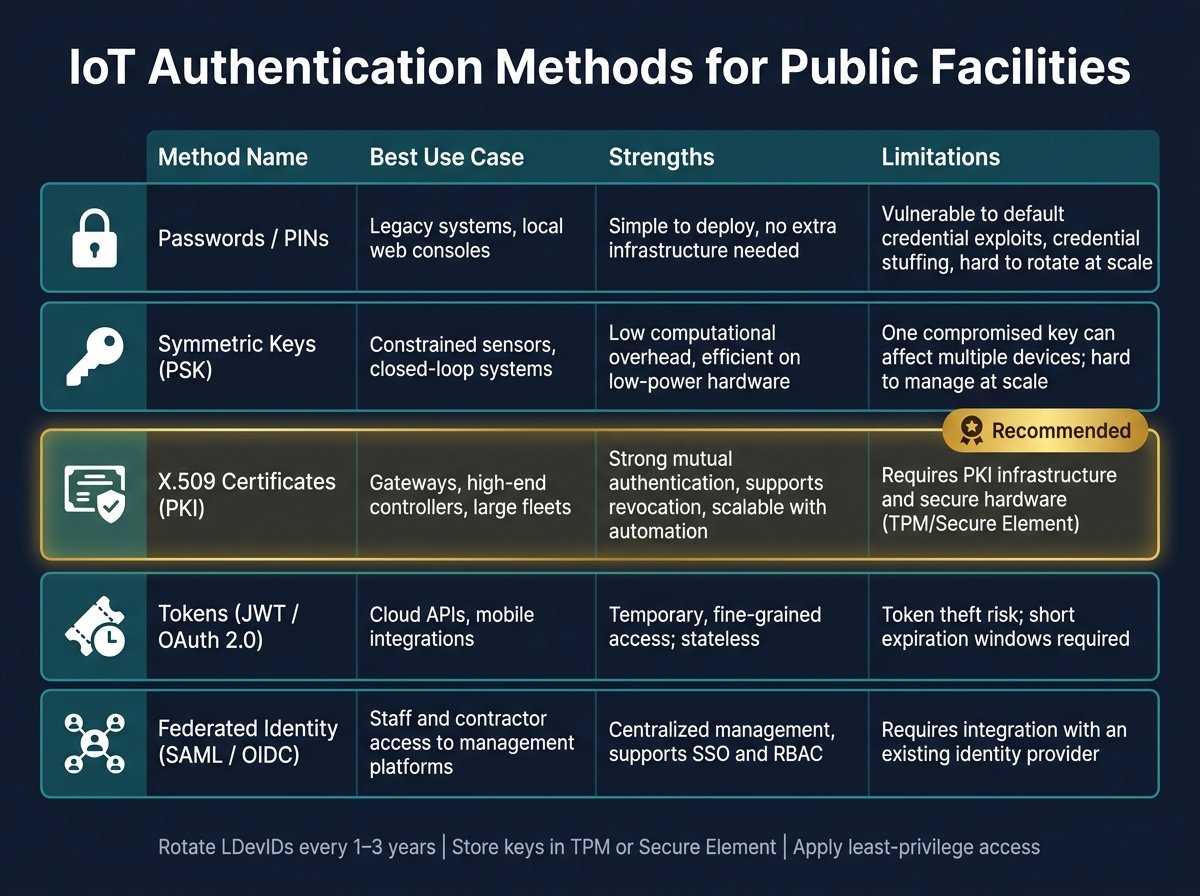
IoT Device Authentication Methods for Public Facilities: A Quick Comparison Guide
There’s no one-size-fits-all authentication method for public-facility IoT. The right choice depends on the device itself: its power, memory, battery life, bandwidth, tamper risk, and the size of the fleet you need to manage [3][6][1].
Older control systems may still depend on passwords or PSKs. But for newer devices, certificates should be the default.
The table below sums up the main options.
| Method | Best Use | Strengths | Limits |
|---|---|---|---|
| Passwords / PINs | Legacy systems, local web consoles | Simple to understand and deploy | Vulnerable to default credential exploits, credential stuffing, and physical access risks; hard to rotate at scale |
| Symmetric Keys (PSK) | Constrained sensors, closed-loop systems | Low computational overhead; efficient on low-power hardware | One compromised key can affect multiple devices; difficult to manage and rotate at scale |
| X.509 Certificates (PKI) | Gateways, high-end controllers, large portfolios | Strong mutual authentication; supports revocation | Requires PKI infrastructure and secure hardware storage |
| Tokens (JWT / OAuth 2.0) | Cloud APIs, mobile integrations | Temporary, fine-grained access; stateless | Short expiration windows are needed to limit theft risk |
| Federated Identity (SAML / OIDC) | Staff and contractor access to management platforms | Centralized management; supports SSO and RBAC | Requires integration with an existing identity provider |
Passwords, PINs, and Pre-Shared Keys
Passwords and PINs are often where legacy building controls begin. You’ll still see them in older systems and simple web consoles because they’re easy to set up and don’t need extra infrastructure.
The problem is just as simple: they’re also easy to abuse. If default manufacturer credentials are left in place, attackers don’t have to work hard. Change default passwords right away [1].
Pre-shared keys (PSKs) work by using the same secret on both ends of a connection. That can make sense for constrained sensors and closed systems with tight hardware limits. But once the fleet gets bigger, manual distribution and rotation turn into a headache fast [6][1].
Symmetric Keys, Tokens, and Certificate-Based Authentication
JWTs and OAuth 2.0 tokens are a good fit for cloud APIs and mobile integrations. They give you temporary, fine-grained access, which makes them useful for user-linked devices and admin workflows. The catch is that token theft can still do damage, so short expiration windows matter [6][1].
For larger public facility portfolios, X.509 certificates are usually the strongest option. In many IoT setups, they’re treated as the gold standard for authentication [1]. They support mutual authentication and work well with automated enrollment and renewal across large fleets [1].
That scale only works if the setup behind it is done right. Use automated enrollment and hardware-backed key storage so certificates can be issued, renewed, and revoked across the fleet. Keys should live in a TPM or secure element, not in standard device memory [6][1].
Federated Identity and Role-Based Access for Staff and Contractors
Device authentication controls machine access. Federated identity controls human access.
For building management platforms, federated identity helps facility teams tie systems into an existing directory service by using SAML or OpenID Connect (OIDC). That gives staff and contractors single sign-on and centralized management instead of a patchwork of separate accounts [3][6].
RBAC then sets the guardrails. Operators, engineers, auditors, and technicians should get only the access needed for their role. ABAC can narrow that access even more based on context and policy. In public facilities, that mix helps stop outside contractors from ending up with more access than their job calls for [3][6].
These identity controls connect directly to the enrollment, rotation, and revocation process that comes next.
Onboarding, Provisioning, Rotation, and Revocation
After you choose an authentication method, the next job is managing it across the device lifecycle. On its own, authentication isn’t enough. It only works when the devices behind it are enrolled, tracked, rotated, revoked, and retired in a controlled way.
Build a Central Device Identity and Inventory
Public facilities need one central identity record for every IoT device. That record should include the serial number, device ID, certificate status, owner, and maintenance state [5][7].
A current inventory makes authentication easier to audit and helps incident response move faster. If you see duplicate credentials, that’s a warning sign. It can point to a setup error or even device cloning. Each device record should also link to its client ID in the registry so teams can troubleshoot issues and respond to incidents without digging through multiple systems [7].
Secure Enrollment for New and Existing Building Systems
Certificate-based onboarding should start at procurement, not at installation. Devices that support IEEE 802.1AR arrive from the manufacturer with an Initial Device Identifier (IDevID). This is a permanent certificate stored in secure hardware such as a TPM or Secure Element [4][7].
| Attribute | IDevID (Manufacturer) | Facility Issued (LDevID) |
|---|---|---|
| Issuer | Device Manufacturer’s Root/Intermediate CA | Organization’s Internal CA or Owner’s PKI |
| Purpose | Onboarding | Operations |
| Storage | Secure hardware (TPM/Secure Element) | Device memory or secure storage |
| Persistence | Permanent; persists after factory reset | Temporary; deleted upon factory reset |
The manufacturer identity proves the device during enrollment. The facility-issued identity handles day-to-day use. Until the device gets its operational certificate, it can stay on a restricted provisioning network [4].
Some older devices can’t use certificates. In those cases, use custom authorization services to validate JWTs or SAML assertions over TLS [7].
Before issuing network credentials, verify both the device identity and its security posture.
Credential Rotation, Revocation, and Decommissioning
Once a device is in service, its credentials need a set maintenance schedule. Rotate LDevIDs every 1–3 years through OTA renewal before they expire [7].
Revocation should happen any time a credential is no longer needed or might be compromised. Use Certificate Revocation Lists (CRLs) or Online Certificate Status Protocol (OCSP) to invalidate credentials. If a facility has spotty connectivity, a mirror CA can keep revocation status available at offline sites [8].
When a device is retired or transferred, do a factory reset to remove the LDevID and any sensitive data. Then mark the device as decommissioned in the central inventory [5].
These lifecycle controls depend on access rules and monitoring to back them up.
Access Rules, Segmentation, Logging, and Oversight
Once credentials are issued and rotated, the next job is control. Public facilities need clear access rules, firm network boundaries, and active oversight so each user and device can do ONLY what it is allowed to do.
Access Models for Internal Teams and Outside Contractors
Not every person needs the same level of access. An IT security administrator may need permission to create or update certificates and policies. A facilities technician may only need day-to-day operating access. Outside contractors should get temporary, role-based credentials instead of permanent access [7].
An API layer can add another guardrail. Instead of letting staff and contractors connect straight to MQTT topics, it puts their activity behind controlled interfaces [7]. That cuts down direct exposure to the IoT data plane.
Least privilege matters here. RBAC separates certificate administration from daily operations, while ABAC narrows access even further by role, site, or contractor status [7][1][3]. Administrative actions should stay separate from routine access so the wrong user can’t delete certificates or detach policies [7].
Those identity rules matter most when the network backs them up.
Network and Device-Level Controls That Enforce Authentication
Authentication tells you who connected. Segmentation decides what that user or device can reach.
Public facilities should place IoT devices on dedicated network segments and use micro-segmentation to isolate devices based on identity and the resources they need [1]. That helps keep HVAC, lighting, water, and life-safety systems apart without getting in the way of normal operations.
For industrial protocols, teams should monitor MQTT and Modbus-connected systems to make sure commands come only from approved sources [1][3]. Each device should be limited to the MQTT actions it needs, such as connect, publish, or subscribe, based on device identity [7]. Manufacturer Usage Descriptions (MUD) can help the network apply the right communication rules on its own [2].
New or untrusted devices should start in a quarantine VLAN. That gives teams time to run identity checks and validate firmware before moving those devices into production segments [9].
Next comes visibility. If you don’t log identity events, enforcement gets hard to prove later.
Logging, Monitoring, and Policy Alignment
Logging turns authentication into an audit trail you can actually use. Capture enrollment, decommissioning, certificate events, failed logins, privilege changes, firmware versions, policy changes, and unusual access patterns [3][5][7].
| Log Category | Specific Events to Capture | Purpose |
|---|---|---|
| Identity Lifecycle | Enrollment, decommissioning, cert revocation | Audit trail for full device lifecycle |
| Access Control | Failed logins, privilege escalation, debug access | Detect brute force or insider threats |
| Operational State | Firmware version, policy changes, update status | Ensure compliance with security baselines |
| Anomalies | Unusual login times, credential reuse, location shifts | Identify compromised or cloned devices |
Feed these events into a centralized SIEM for real-time monitoring, audit trails, and incident investigations [3][5]. Automated auditing can also track device configurations, verify security policies, and flag expiring certificates [7].
One pattern deserves close attention: multiple devices authenticating with the same identity credentials. That’s a red flag. It can point to unauthorized cloning or a bad setup. Correlating the device registry name with the MQTT client ID in logs makes it easier to connect communication events to the right physical asset [7].
These logs give security teams the record they need for audits, incident response, and policy reviews.
Conclusion: A Practical Authentication Plan for Public Facility IoT
These controls turn IoT authentication into a lifecycle process, not a one-and-done setup. For devices that stay in service for years, use certificate-based mutual authentication with automated rotation and hardware-rooted keys.
That process needs a central registry. Track every device in one place so onboarding, rotation, revocation, and retirement stay auditable.
Apply least privilege to both devices and people. Give devices access only to the APIs they need, and give staff and contractors temporary, scoped access.
Logging closes the loop. Log identity events on a continuous basis and review authentication logs against your asset inventory and access policies on a regular schedule.
Authentication works best when it’s managed across the full device lifecycle, not treated like a one-time configuration.
FAQs
How do I choose between certificates, PSKs, and passwords?
Choose based on the device, how you plan to manage it, and how much security you need. Certificates are the safest option, and they’re the best fit for company-managed devices that support 802.1X.
For headless IoT devices that can’t handle 802.1X or certificates, use MPSK with a different key for each device. Avoid shared passwords unless you need a short-term stopgap while you migrate.
What should I do if a device credential is stolen or duplicated?
Immediately revoke the compromised credential and any related certificates to stop unauthorized access. Revocation is the main line of defense because it lets you shut off the affected device without disrupting the rest of the network.
Then confirm the device has been removed from all inventories and trust stores. E3 Design-Build Contractor points to prompt revocation as part of secure identity lifecycle management.
How can I onboard older IoT devices that do not support certificates?
Older IoT devices that don’t support certificates can still be brought on securely. The usual path is credential-based authentication paired with modern network access controls.
Two common approaches are:
- EAP-PEAP
- Automated provisioning through a password vault API
A common setup is to place devices for a short time on a restricted network segment. For example, you can use MAC Authentication Bypass so the device can receive its credentials first. After that, move it to a more secure 802.1X-compliant state.
One more thing: keep service accounts tightly limited. Small permissions, short access, and strict scope go a long way here.