
A BAS can drift fast, and that drift gets expensive. In public buildings, HVAC often drives 40%–60% of energy spend, emergency repairs can cost 4x to 5x more than planned work, and tuned HVAC maintenance may cut energy use by up to 30%.
If I had to sum up the article in one line, it’s this: I get better BAS results when I treat maintenance like a repeatable checklist, not a fix-it-later task.
Here’s the short version:
- I start by matching BAS work to building goals, like fewer comfort issues, lower utility bills, or less equipment downtime.
- I check the systems that matter most first: AHUs, chillers, boilers, cooling towers, and fans.
- I make sure records are correct before changing controls, including point lists, sequences, graphics, asset data, and user access.
- I review schedules, holiday calendars, setpoints, deadbands, and controller clocks so the BAS matches how the building is used now.
- I use BAS data for maintenance, including runtime-based service, sensor calibration, actuator checks, and repeat fault tracking.
- I clean up alarms and trends so I can spot drift early and confirm repairs with data before closing issues.
- I lock down access, check updates and backups, and compare current performance against a baseline.
A few numbers stand out:
- A failed outdoor air sensor can cut chiller efficiency by 15%–20%.
- Simultaneous heating and cooling can waste 8%–15% of HVAC energy.
- If occupancy changes but control sequences do not, building performance can slip by 25%–35% within 36 months.
- BAS-linked work orders may cut fault-to-repair time by up to 65%.
Bottom line: I do not need to tune every point at once. I get the most from BAS maintenance when I check records first, fix schedules and setpoints, use alarms and trends to catch drift, and keep the system secure after the fixes are made.
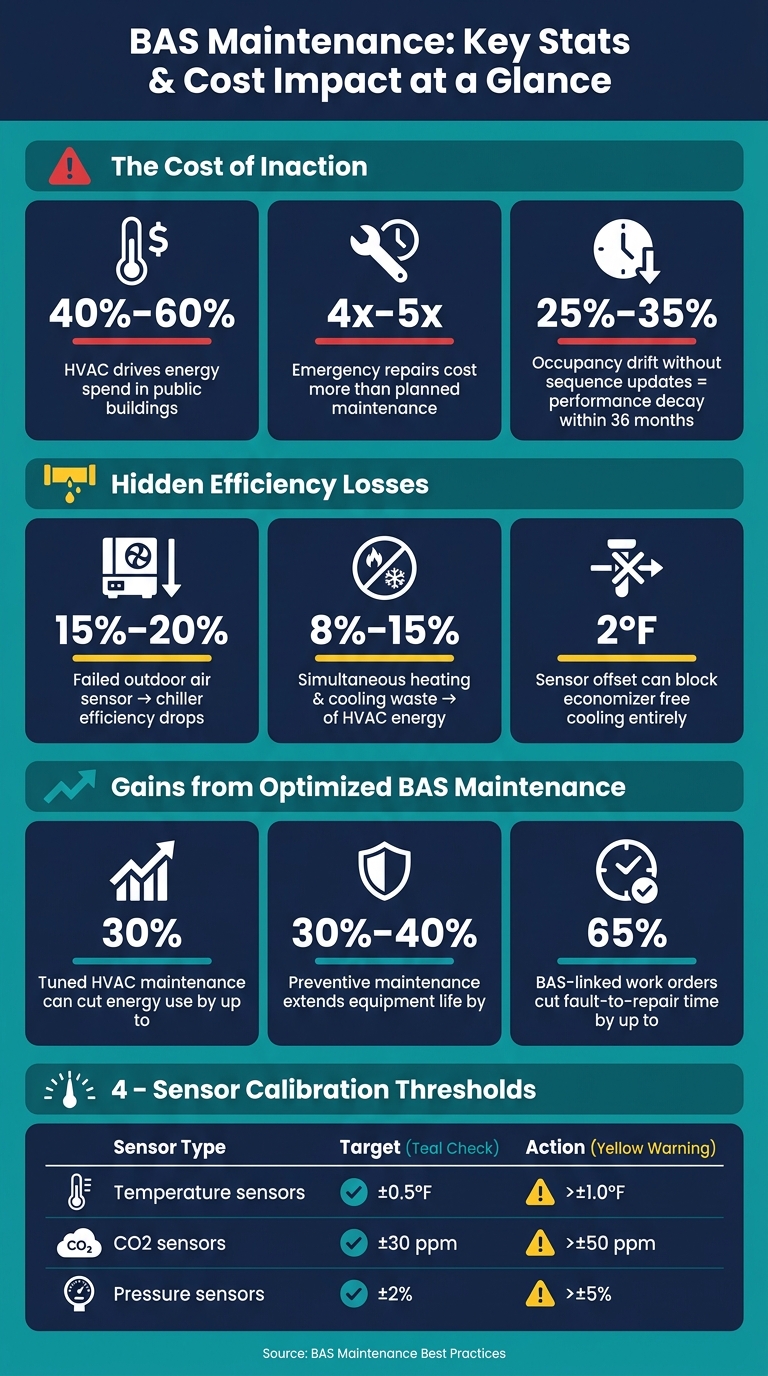
BAS Maintenance: Key Stats & Cost Impact at a Glance
Top 5 Preventative Maintenance Strategies for Your Building Automation System
sbb-itb-034f8e1
Checklist 1: Confirm BAS Documentation and Asset Inventory
Once you’ve ranked the systems that matter most, the next step is simple: make sure the records behind them are right.
Good BAS maintenance starts with good documentation. If drawings are out of date, point lists are wrong, or asset records are missing, troubleshooting takes longer and mistakes pile up. Solid BAS documentation cuts downtime and helps teams avoid chasing the wrong fix. That makes it the starting point for every maintenance task that comes next.
Verify Point Lists, Sequences, and Control Diagrams
Check that BAS graphics, point labels, live values, and equipment links line up with what’s installed in the field. A semi-annual audit of at least 10% of system graphics is a practical way to spot mismatches before they turn into bigger issues [1].
Graphics are only part of the picture. Sequences of operation (SOO) also need annual functional testing. Use BAS overrides to simulate actual conditions, like economizer transitions and static pressure resets, then compare the system’s response with the documented logic. If the system behaves differently than the sequence says it should, treat that as a control logic issue [1].
Your asset registry should include every chiller, AHU, boiler, and controller. That means model numbers, installation years, refrigerant types, and service history [5]. Keep refrigerant logs, boiler inspection records, and LOTO procedures current for each asset [5].
The next check is about control: who can change these records, and how those changes are managed.
Document Integrated Systems and Change Authority
Untracked overrides can cause major headaches during service. They create blind spots and often lead to the same control issue showing up again and again. Document who can change schedules, setpoints, and overrides, and tie each change to a named user. Remove shared or generic accounts, and enforce strong password policies [1].
Map BAS links to lighting, access control, and fire systems so maintenance work doesn’t trigger testing problems or safety conflicts [2][3].
Use the table below to track documentation tasks and review frequency:
| Document / Component | Verification Task | Recommended Frequency |
|---|---|---|
| Sequences of Operation | Functional testing using BAS overrides | Annual [1] |
| System Graphics | Field-to-interface alignment check (10% sample) | Semi-Annual [1] |
| Asset Registry | Update model, refrigerant, and install data | Ongoing / Annual [5] |
| Device Addresses | Audit MSTP/IP unique addresses and termination | Semi-Annual [1] |
| User Accounts | Audit access levels, disable inactive accounts | Quarterly [1] |
| Refrigerant Logs | Leak inspection records for systems over 50 lbs | Annual (EPA 608) [5] |
Checklist 2: Review Schedules, Setpoints, and Preventive Maintenance Inputs
Once the documentation checks out, the next step is simpler in theory and messier in practice: look at what the BAS is doing every day, then compare that with how people use the building.
A lot of waste starts here. The system may be following its programming perfectly while serving a schedule that no longer fits the space.
Check Occupied Schedules, Holiday Calendars, and Zone Run Times
Review schedules against actual occupancy, not assumed occupancy. One building-wide schedule usually doesn’t fit every zone, wing, or campus area. Different spaces have different patterns, and that’s where after-hours overrides, stale holiday calendars, and long run times start to chip away at performance.
Overrides should stay temporary. Fix the issue, then remove the override. If they linger, they become the new normal without anyone meaning for that to happen.
Controller clocks matter too. Sync them to server time every month so occupancy changes happen when they’re supposed to. If control sequences aren’t updated as occupancy shifts, building performance can decay by 25% to 35% within 36 months [4].
Validate Setpoints, Deadbands, and Seasonal Adjustments
Manual overrides that never got cleared are a common source of waste. They can force heating and cooling to run at the same time, which typically wastes 8% to 15% of total HVAC energy [4]. A quarterly setpoint review helps catch and remove those overrides before they stack up [2][5].
Before summer cooling peaks and winter heating peaks, test economizer and static-pressure resets using BAS overrides. Small sensor errors can have outsized effects. An outdoor air temperature sensor offset of only 2°F can block economizer free cooling [2]. And if that sensor fails, chiller efficiency can drop by 15% to 20% for a full season [2].
For calibration, keep temperature sensors within ±0.5°F of a NIST-traceable reference. Any reading beyond ±1.0°F should trigger corrective action [2]. PID loops need attention on a schedule too. Retune them every six months; about half need adjustment within that period [6].
| Component | Acceptable Range | Action Trigger | Review Frequency |
|---|---|---|---|
| Temperature Sensors | ±0.5°F of reference | >±1.0°F deviation | Annually [2] |
| CO2 Sensors | ±30 ppm at 1,000 ppm | >±50 ppm deviation | Annually [2] |
| Pressure Sensors | ±2% of reading | >±5% deviation | Semi-annual [2] |
| PID Control Loops | Steady output | Hunting or sluggish response | Semi-annual [6][1] |
| Controller Clocks | Synced to server | >1 minute drift | Monthly [1] |
Use BAS Data to Support Preventive Maintenance and Calibration
Calendar-based maintenance sounds neat, but equipment doesn’t wear out on a neat calendar. Runtime hours from the BAS give you a better read on when filters, belts, and motors need service [7].
That matters because emergency HVAC repairs cost five times more than planned preventive interventions [5]. On top of that, structured preventive maintenance programs can extend equipment service life by 30% to 40% [7].
Trend data can also guide calibration work. When a sensor drifts beyond ±1.0°F, use that as the trigger for a calibration task [2]. For actuators, command them to 0%, 50%, and 100% every quarter. That simple check helps confirm full range of motion and spots slow or stuck parts before they turn into bigger problems [1].
When the same sensor or actuator fault keeps coming back, don’t treat it like a random blip. Push it into the alarm review process and track it as a corrective action, not a one-off fix.
Checklist 3: Monitor Alarms, Trends, and Corrective Actions
Documentation and setpoints matter, but BAS maintenance only works when teams catch faults early, act fast, and confirm the fix after the repair. Once schedules and setpoints are stable, alarms and trend data help you spot what still slips out of range.
Reduce Nuisance Alarms and Set Useful Thresholds
After schedules and setpoints are dialed in, export alarm logs every month and flag any alarm that shows up more than 5 times during that period. Repeats like that usually point to root causes that need attention [1][8].
Use a 30-minute alarm delay before sending an alert when a value goes out of range. That simple buffer helps screen out short spikes that fix themselves. Then set tight thresholds based on the specific piece of equipment, not a one-size-fits-all rule [2].
Routing also makes a big difference. If BAS alerts feed into a CMMS, validated faults can turn into work orders on their own. That cuts down on false alerts and speeds up triage instead of letting issues sit in an ignored email inbox [4].
Trend Key Points to Catch Performance Drift Early
Trend data shows the slow drift that daily checks often miss. And once controls are stable, that drift is much easier to see.
Log temperature, pressure, and energy data at 15-minute intervals. For equipment status and setpoints, use on-change logging to save storage. Keep at least 90 days of data for operating review, and up to 3 years for seasonal comparison [8].
A few patterns tell you a lot:
- A sawtooth damper trend usually points to PID retuning.
- A slow temperature drift often points to sensor calibration loss.
Each trend review should lead to a clear next step: calibration, retuning, or a work order.
Verify Repairs Before Closing BAS Issues
Don’t close a BAS issue just because the repair is done. Close it only after post-repair verification shows the system is back at its target state [8].
Compare trend data from before and after the repair to confirm the fix held [8]. Then document the corrective action with both the fault state and the corrected state. Attach trend screenshots or photos right to the asset record [4].
Linking BAS faults to CMMS work orders can cut fault-to-repair time by as much as 65% [4].
After faults are closed and verified, review who has permission to change the BAS and check whether performance still lines up with baseline.
Checklist 4: Secure the BAS and Maintain Long-Term Performance
Once corrective actions are done, the next step is simple: protect the progress. If access stays loose or updates get skipped, a BAS can drift back out of shape without much warning. That can wipe out the work from the earlier checklist items.
Review User Access, Remote Connections, and Update Status
Use the checklist below to review access, patching, and backup controls. After that, confirm the system still performs at baseline.
| Security Task | Frequency | Key Action |
|---|---|---|
| User Account Audit | Quarterly | Disable inactive accounts (>90 days) and remove shared or generic credentials [1] |
| Password Policy Review | Quarterly | Enforce complexity, expiration, and non-reuse policies; change default manufacturer credentials [1][9][4] |
| Firmware/Software Update Check | Monthly/Quarterly | Confirm controllers run the latest approved and patched versions [1][3] |
| System Backup | Quarterly | Export logic, graphics, alarm settings, and user accounts to secure storage [1] |
| Restore Testing | Annually | Verify that backups can be successfully loaded and run [1][2] |
| Cybersecurity Audit | Annually | Review access logs for unusual activity, network segmentation, and port status [9] |
A few of these checks are easy to put off. That’s where trouble starts. A shared login, an old controller version, or a backup that looks fine but won’t restore can turn into a major headache later.
Compare Current Performance Against a Baseline
Use the same trend and alarm data from Checklist 3 to make sure the BAS still matches its tuned state. Compare chiller COP, fan current, sensor drift, alarm frequency, and PM completion against the documented baseline [2][9]. Annual audits should also include energy consumption data and utility bill comparisons [3][9].
| Checklist Area | Current State | Target State | Evidence to Verify |
|---|---|---|---|
| Temperature Sensor Accuracy | Measured reading vs. reference | ±0.5°F of NIST-traceable reference [2] | Calibration log with technician sign-off |
| Controller Uptime | Logged uptime percentage | 99.9% [2] | CMMS or BAS trend report |
| Network Communication Health | Device discovery success rate | >99% [2] | Network diagnostics report |
| Alarm Frequency | Alarms per point per month | Less than 5 per point per month [1] | Monthly alarm export |
| PM Completion Rate | Inspections completed vs. scheduled | 95% of quarterly inspections [2] | Inspection records in CMMS |
This is the gut check. If the numbers no longer line up with the baseline, something changed. Maybe a sensor drifted. Maybe alarm noise started creeping back in. Maybe PM work fell behind. The table helps you spot those issues before they become bigger system problems.
Keep audit-ready records for every sensor calibration, firmware update, and access change. Those records help meet regulatory requirements and support insurance documentation [9][4].
Conclusion: Build a Repeatable BAS Maintenance Checklist
A BAS maintenance program works best when each checkpoint supports the next one. Good documentation gives you a dependable asset inventory. Schedule and setpoint reviews keep operations tied to how the building is actually used. Preventive maintenance inputs and calibration records help stop the slow drift that eats away at efficiency. Alarm filtering and trend monitoring catch issues that daily checks can miss. Verified corrective actions show whether repairs held. Secure access controls, along with regular baseline comparisons, help keep those gains in place.
FAQs
Where should I start with BAS maintenance?
Start with a structured preventive maintenance process instead of treating your BAS like a set-it-and-forget-it system. A little routine attention goes a long way here.
Check the BAS dashboard every day for alerts, communication errors, or odd readings. If something looks off, it usually is. Pair that with regular visual inspections to spot loose wires, damaged devices, or anything else that looks worn out before it turns into a bigger problem.
Then spend time on the tasks that have the biggest payoff: sensor calibration, controller health checks, and making sure system backups are working the way they should.
How often should BAS schedules and setpoints be reviewed?
BAS schedules and setpoints should be reviewed quarterly as part of standard controller inspections.
They also need regular review as building use, occupancy patterns, and equipment needs change. If alerts are being ignored or building functions have shifted, check them sooner so control sequences stay accurate, efficient, and cost-effective.
What BAS trends and alarms matter most?
Prioritize data trends and alarm management to move BAS maintenance from reactive to proactive.
Pay close attention to supply air temperature, airflow, and valve positions. Also, log temperature and pressure data at five-minute intervals. That steady stream of data helps you spot patterns before they turn into service calls.
If an alarm shows up more than five times in a month, dig into it. Repeated alarms often point to root causes like control instability or sensor drift. In plain terms, the alarm is usually telling you something is off – it’s not just making noise.
It also helps to adjust alarm thresholds on a regular basis. That cuts down on nuisance alerts and makes it easier for operators to focus on the issues that need attention now.