
If you run a Texas public building, building automation data can become a records and privacy issue fast. Access logs, occupancy reports, alarm history, and user activity may fall under the Texas Public Information Act, and a public entity may have only 10 business days to ask for an Attorney General ruling when it wants to withhold records.
I’d boil the article down to 4 checks:
- Map every person-linked record across BAS, lighting, access control, sensors, and dashboards
- Limit access to named users, remove old accounts, and log remote sessions
- Review vendors and contracts for data ownership, use limits, deletion, breach notice, and subcontractor rules
- Fix policy gaps by assigning one owner, one due date, and one status for each issue
A few points stand out:
- Texas retention schedules set minimum retention periods for some security access records
- Records usually cannot be destroyed if litigation, an audit, or a public information request is pending
- Vendor access is a common weak spot, especially when remote access stays active after a project ends
- High-risk fixes often start with MFA, role cleanup, retention settings, and contract updates
Here’s the article in one line: know what data your systems create, know who can get to it, know what vendors can do with it, and know how long you keep it.
That’s the frame I’d use for annual reviews, system upgrades, and contract renewals.
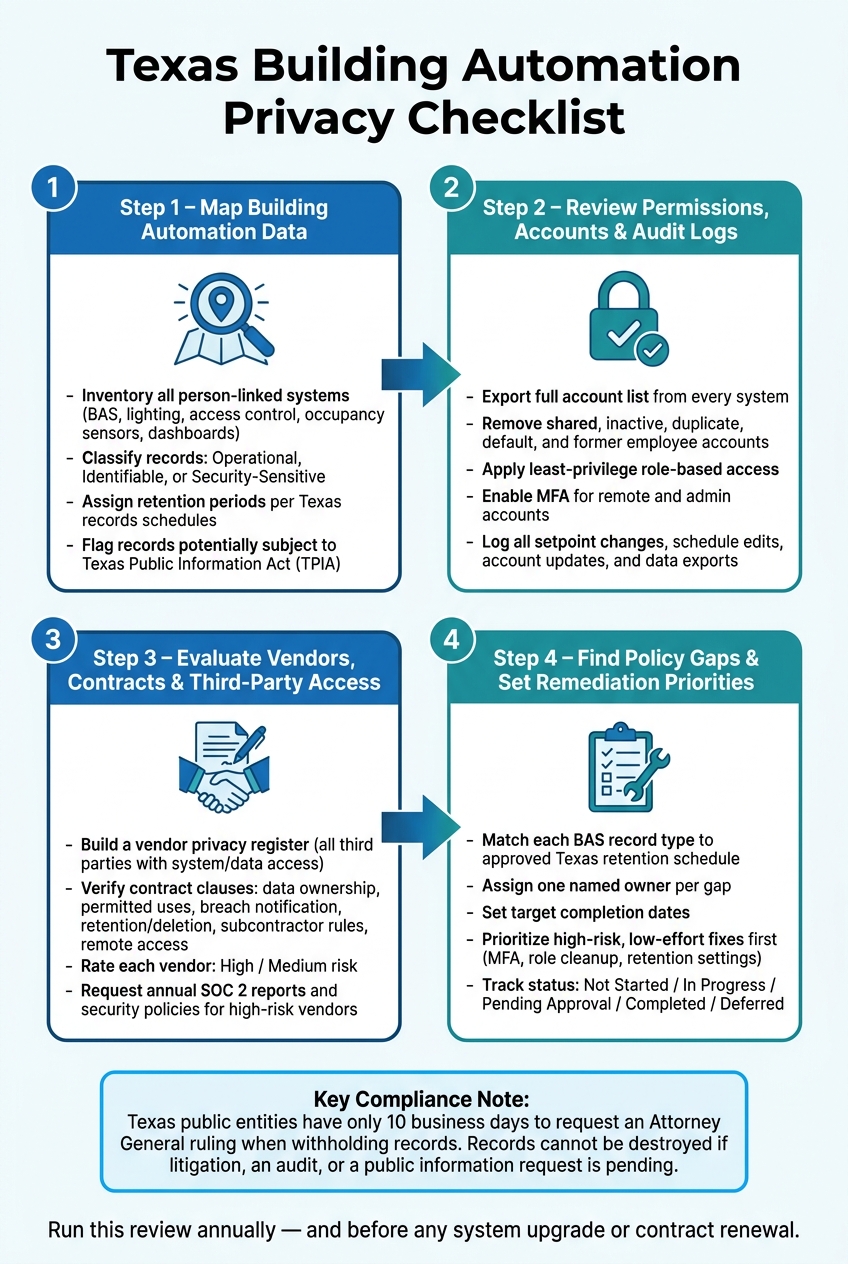
Texas Building Automation Privacy Checklist: 4-Step Compliance Process
SBA 405: Cyber Security for Building Automation Part 1
sbb-itb-034f8e1
Checklist 1: Map Building Automation Data and Records
Before you look at permissions, vendor contracts, or policy gaps, get a plain, complete view of every system that creates or sends person-linked data. That means more than badge readers and cameras. It also includes HVAC controllers, lighting panels, occupancy sensors, and dashboards. Only inventory systems that create or transmit person-linked records. This inventory becomes the starting point for access review, vendor review, and retention decisions.
List Systems, Sensors, and Person-Related Data Points
Group systems into six categories: HVAC and environmental controls, lighting, physical access control, occupancy sensing, video and security integrations, and central dashboards. Don’t stop at system names. Record the actual data fields each system handles.
For access control, capture badge ID, cardholder name, department, role, door ID, entry and exit timestamps, access granted or denied events, visitor registration records, temporary badge assignments, and special access flags.
For HVAC and BAS, include operator user IDs, setpoint change history, manual override logs, comfort complaint tickets tied to an email or work order system, and zone identifiers. Pay close attention when a zone maps to a specific class, office, or patient area.
Lighting controls can show occupancy patterns through time-stamped on/off and dimming events tied to particular rooms or departments.
For occupancy sensors, document:
- Sensor type, such as PIR, ultrasonic, thermal, or time-of-flight
- Zone coverage
- Estimated counts
- Whether the data can become identifiable when matched with other logs
For dashboards, capture user accounts, roles, login history, IP addresses, actions taken, and any merged views that pull together energy, comfort, and access data.
You also need to map how systems connect to one another. Record all upstream and downstream connections, including interface type, transfer frequency, and whether fields are passed, changed, or rolled up. Cross-system flows can create identifiable records even when no single system shows the full picture. That’s often where privacy risk shows up – not in one device, but in the link between several of them.
Classify Records, Sensitive Data, and Retention Needs
After the inventory is built, assign a classification to each data type. Operational – Non-Identifiable fits data like aggregate kWh by building, supply air temperature trends, or anonymous whole-building occupancy counts.
Identifiable – Standard Sensitivity applies when a log can be tied to a specific person, such as a badge entry record linked to a cardholder name or a BAS operator action tied to a single login.
Identifiable – Security-Sensitive should be used for records that could affect safety or expose critical infrastructure details. Examples include door lock schedules for server rooms, after-hours access logs for secure areas, or real-time occupancy data for offices assigned to one person.
For each record type, capture retention details. That includes the system’s default retention setting, the approved Texas retention period, and how records are archived and deleted when retention ends. Texas state records retention schedules set minimum retention periods for security access records – keys, ID cards, badges, and building passes – and prohibit destruction when litigation, audits, or public information requests are pending.[1][2][3] Mark any record type that may become subject to a public information request.[1][2][3] That flag helps your team loop in the public information officer or legal team early, before a request lands.
Use this table to track classification, retention, and integration risk.
| Column | What to Capture |
|---|---|
| System Name & Type | BAS, lighting, access control, occupancy, dashboard |
| Vendor / Product | Name, version, hosting (on-prem or cloud) |
| Person-Related Fields | Badge ID, name, timestamp, door/zone, event type |
| Data Classification | Operational, Identifiable, Security-Sensitive |
| Potentially TPIA-Relevant? | Yes / No / Depends |
| Approved Retention Period | Per Texas records schedule |
| Archiving & Deletion Method | Format, location, verification process |
| Key Integrations | Upstream sources and downstream consumers |
Assign one named owner and one backup owner for each row. If nobody owns it, it usually gets missed. And when new systems come in through capital projects or infrastructure upgrades, complete the inventory entry before the system goes live, not after. That table should feed straight into your records and retention review.
Checklist 2: Review Permissions, Accounts, and Audit Logs
Once your data inventory is done, the next step is simple: make sure the right people can get into the right systems – and no one else can. Each account should have ONLY the access needed for that person’s job. Use the data map from Checklist 1 to see which accounts can view, edit, or export badge logs, occupancy data, and other person-related records.
Confirm Role-Based Access and Remove Unnecessary Permissions
Start by exporting a full account list from every system in your inventory, including BAS platforms, lighting controls, access control software, and dashboards. Then review each account one by one. It should belong to a named individual, not a shared login.
As you go, look for accounts that shouldn’t still be there, such as:
- Shared accounts
- Inactive accounts
- Duplicate accounts
- Default accounts
- Former employee accounts
- Old vendor accounts
Disable or delete those accounts during the review.
Next, match each role to the least amount of access it needs. That makes it much easier to spot accounts with too much power. The table below shows common roles, the systems they should access, and what they should be allowed to do.
| Role | System Access | Permitted Actions | Remote Access Allowed |
|---|---|---|---|
| Director of Maintenance | BAS, lighting, access control, dashboards | Full admin: scheduling and overrides | Yes, with MFA and session logging |
| Energy Management Coordinator | BAS, dashboards | View logs, adjust setpoints, run reports | Yes, with MFA |
| IT Administrator | Network layer, identity management | Account security, MFA setup, network configuration | Yes, with MFA and session logging |
| Security Team | Access control systems | Review access activity and logs | Limited, logged |
| Contractor Support | BAS, lighting, access control | Install, commission, troubleshoot | Temporary only, session-logged, disabled after project |
| Superintendent / Senior Admin | Dashboards | View reports and savings summaries | No, or view-only portal |
Contractor accounts need extra attention. A contractor may need temporary admin or remote access during installation, commissioning, troubleshooting, or after-hours work. That’s fine – but tie that access to a project window, then remove it at closeout.
Verify Authentication, Remote Access Controls, and Logging
Use a separate set of credentials for every account, and turn on MFA for remote and admin access. If the system allows it, require MFA for any account that can change building automation records or controls. Remote sessions should be logged with timestamps and the actions taken.
Audit logs should capture:
- Setpoint changes
- Schedule edits
- Account updates
- Data exports
You’ll use these access and logging findings in Checklist 3 when you review vendor contracts and third-party access.
Checklist 3: Evaluate Vendors, Contracts, and Third-Party Access
Now turn to the contracts and oversight rules for any vendor with system or data access. Texas public entities often work with several vendor types that touch building automation data, including BAS platform providers, HVAC and controls integrators, lighting controls vendors, access control vendors, managed service providers (MSPs), and design-build contractors. Each one brings a different level of privacy risk based on what they can see and what they can control.
Start with the vendors that can view, export, or change building records.
Document Vendor Access, Data Use, and Contract Requirements
Create a vendor privacy register. In plain English, that’s one central list of every third party with access to your BAS, lighting, access control, or related platforms.
For each vendor, record:
- the systems they touch
- the data they can view or modify, including operational data versus person-related data
- their level of control, such as view-only, configuration, or remote command
- how they connect, whether by VPN, web portal, or remote desktop
Once that inventory is done, pull the contracts and review them for a few specific clauses.
- Data ownership: Your entity owns all data generated by building automation systems, including badge logs, occupancy data, and operator actions. The vendor is a data processor or service provider, not a co-owner.
- Permitted uses: The vendor can use your data only to deliver the contracted service. Any secondary use needs explicit written approval.
- Breach notification: Require notice within a defined, short incident-notification window.
- Retention and deletion: State how long vendors keep logs and backups, and require secure deletion or certified return when the contract ends.
- Subcontractors: Require vendors to pass the same duties to subcontractors and disclose those subcontractors to your entity.
- Remote access expectations: Spell out approved access methods, authentication rules, and logging expectations for vendor sessions.
If any of those terms are missing, flag the contract for legal or procurement review before the next renewal.
Rate Vendor Risk and Monitor Access Over Time
Rate vendors based on data sensitivity, system control, and network reach. For example, an access control vendor with a full cardholder database and remote desktop access to door controllers should be treated as high-risk.
Use U.S. date format for the last review date: MM/DD/YYYY. Update it after each annual review.
| Vendor Category | Systems/Data Accessed | Risk Level | Key Contract Clauses | Last Review Date |
|---|---|---|---|---|
| BAS Platform Provider | HVAC schedules, occupancy data, user accounts, trend logs | High | Data ownership; breach notification; retention/deletion; MFA for remote access | 07/10/2026 |
| Access Control Vendor | Badge database, door event logs with staff names | High | Entity owns data; permitted uses limited to services; breach notification; subcontractor disclosure | 07/10/2026 |
| Lighting Controls Vendor | Occupancy sensor logs, zone schedules | Medium | Permitted use; confidentiality; remote access controls | 07/10/2026 |
| MSP / Cloud Host | BAS databases, logs, backups | High | Data ownership; confidentiality; breach notification; deletion at contract end | 07/10/2026 |
| Design-Build Contractor | Commissioning data, point lists, integration interfaces | Medium | Documentation requirements; temporary access only; audit logging | 07/10/2026 |
For high-risk vendors, don’t stop at the contract. Ask for current security documents, such as SOC 2 reports, security policies, and incident response plans, and review them every year. It also helps to run periodic access certification campaigns, where system owners confirm or revoke vendor accounts. That’s one of the simplest ways to stop old access from hanging around after a project wraps up.
Where Implementation Support Fits In for Texas Projects
During design and commissioning, E3 Design-Build Contractor can help align access controls, logging, and documentation with privacy requirements before systems go live. Any gaps you find here can feed directly into Checklist 4.
Checklist 4: Find Policy Gaps and Set Remediation Priorities
Use what you found to assign fixes, owners, and deadlines. This is the point where privacy findings stop being notes and start becoming a tracked work plan. The next move is simple: turn each issue into an assigned fix.
Check Alignment with Records Policies, Privacy Rules, and OT Procedures
Use the inventory, access review, and vendor findings to see whether written policies match day-to-day practice. For each system reviewed in Checklists 1 through 3 – including access logs, occupancy data, vendor sessions, and remote access records – confirm these points:
- Is the system’s data listed in the retention schedule with a set retention period? Match each BAS record type to the approved retention schedule.
- Does staff know that a public information request could reach these logs, and who handles that response?
- Do OT procedures cover remote access, MFA, log retention, and incident reporting for this system?
On the OT side, Texas DIR security control guidance requires entities to document use limits and connection requirements for each remote access type.[1] If your BAS vendor connects through a web portal and that connection is not covered in your OT procedures, you have a policy gap.
Assign Owners, Deadlines, and Remediation Status
Once you document the gaps, assign one accountable owner to each one. That matters. If everyone owns it, no one owns it.
A gap tied to uncontrolled vendor remote access should sit with the OT Manager or Director of Facilities. A missing retention rule for access control logs should sit with the Records Management Officer. An unreviewed occupancy analytics feature should sit with the Privacy Officer.
Set a target completion date that matches the actual work involved. Enabling MFA on a vendor VPN may be a quick technical change. Renegotiating a contract clause or updating a retention schedule can take more time because procurement or approval steps get in the way. Build that into the plan up front, and mark blockers in the status column instead of letting dates drift quietly.
Use the table below as a template.
| Privacy Gap | System/Scope | Risk Level | Owner | Fix | Target Date | Status |
|---|---|---|---|---|---|---|
| No defined retention for access control logs | District HQ access system | High | Records Mgmt Officer | Draft and approve retention rule; configure log purge at 3 years | 09/30/2026 | In Progress |
| Vendor remote access without MFA | City Hall BAS | High | OT Manager | Implement MFA for vendor VPN; update remote access policy | 08/31/2026 | Not Started |
| Occupancy analytics not covered by privacy policy | Campus HVAC/lighting | Medium | Privacy Officer | Conduct privacy impact assessment; update privacy notice | 11/01/2026 | Pending Approval |
Use clear status labels: Not Started, In Progress, Pending Approval, Completed, and Deferred. Require owners to give updates during quarterly security or compliance meetings. High-risk, low-effort fixes – like tightening access roles, enabling MFA, or correcting a retention setting – should go first. High-risk items that need contract renegotiation, system upgrades, or leadership approval should be handled as formal projects with leadership sponsorship and budget.
Track each item until it is closed or formally deferred.
Conclusion: A Practical Privacy Review Process for Texas Facilities
The four checklists in this article follow a simple path for records, access, vendor oversight, and policy gaps: map data, restrict access, review vendors, and close policy gaps. Each step sets up the next. A solid data inventory makes classification easier. Clear classification makes access calls easier. Written access controls give vendor review something concrete to check. Then all of that rolls into a gap list with owners, deadlines, and status tracking.
For this checklist to stay useful, run it on a set schedule. Repetition is what makes it work. Texas public entities manage facilities that change over time. A one-time review gets old fast. Run the review every year so records, access rules, and vendor terms stay up to date.
Put one person in charge, but bring in facilities, IT, records, legal, and compliance. Facilities directors know how systems are used in day-to-day work. IT and OT teams understand authentication and logging. Records officers know what Texas retention schedules require. Legal and compliance staff can spot contract gaps. No single department sees the whole picture, so the review needs to be shared.
That shared ownership should also include contractors. Pull contractor terms into the yearly review. Firms hired for building automation work – including design-build contractors supporting HVAC, lighting, or integrated controls – should work under contracts that spell out data use, remote access logging, incident reporting, and limits on data retention or secondary use. Check those terms each year, not just when the contract is signed.
Consistent review is what keeps privacy controls current as systems and vendors change. Review every year, assign owners, and close gaps.
FAQs
What building automation data is considered person-linked?
Building automation data becomes person-linked when it can identify someone, connect data to them, or help track their behavior over time.
That can include access control logs and occupancy sensor data. On their own, those records may seem harmless. But once you combine them with timestamps or user credentials in a central platform, they can reveal a lot more.
For example, those records can show where a person went, when they moved through the building, and what they were doing inside a facility.
How often should a Texas public entity review BAS privacy controls?
Texas public entities should review building automation system settings on a regular basis. There isn’t one fixed schedule that every organization has to follow, but steady oversight helps keep privacy controls, access permissions, and energy sequences in good shape.
These checkups should also confirm that HVAC schedules line up with how the building is actually used, including weekends and holidays. Over time, controls can drift. When that happens, systems may run longer than needed and power use can creep up.
What contract terms matter most for vendor access?
Texas public entities should put contract language in place that requires open communication protocols like BACnet. That step can help reduce vendor lock-in and make it easier for systems from different makers to work together.
Contracts should also spell out who has permission for remote monitoring and management. Just as important, they should keep facility staff in control of system changes and day-to-day adjustments.
It also helps to state who can access the site for assessments and maintenance, so there’s less confusion later. And because many building systems now include connected devices, contracts should clearly set security requirements for IoT-enabled devices.