
If you need one short answer: use BACnet for building-wide control, and use Modbus for single equipment data.
I’d sum it up like this: BACnet gives you more context, while Modbus gives you simple point access. In public facilities, that usually means BACnet fits HVAC, lighting, alarms, schedules, and campus-level control. Modbus fits meters, VFDs, generators, UPS units, and older gear that already speaks register data.
Here’s the decision in plain English:
- Choose BACnet when you need:
- Multi-system visibility
- Shared schedules and alarms
- Auto-discovery with
Who-Is/I-Am - Rich point data like units, status flags, and trends
- Choose Modbus when you need:
- Data from meters or packaged equipment
- A low-complexity way to read raw values
- Retrofit support for older RS-485 devices
- A small number of points, not full building coordination
- Plan for both when your site has:
- A BACnet BMS
- Modbus-only meters or field devices
- Gateway mapping during phased upgrades
A big part of the choice comes down to data structure. BACnet uses objects and properties. Modbus uses 16-bit registers. That changes discovery, setup time, mapping work, and how much meaning comes with each point.
Quick Comparison
| Criteria | BACnet | Modbus |
|---|---|---|
| Main role | Building automation | Equipment data |
| Data format | Objects with properties | Registers and bits |
| Discovery | Yes | No |
| Network style | Event-based or polling | Polling |
| Point context | Units, status, alarms, trends | Raw values, vendor map needed |
| Common devices | HVAC, lighting, controllers | Meters, VFDs, UPS, generators |
| Retrofit use | Building-level upgrades | Legacy devices and submetering |
| Extra setup risk | IP/subnet and MS/TP setup | Scaling, offsets, word order |
One fact matters early: Modbus RTU addresses run from 1 to 247, and BACnet/IP discovery does not cross subnets unless BBMD or Foreign Device Registration is set up. Small details like that can add hours during commissioning.
If I were choosing for a school, hospital, college campus, or city building, I’d treat BACnet as the control layer and Modbus as the equipment layer. That’s the core takeaway from this comparison.
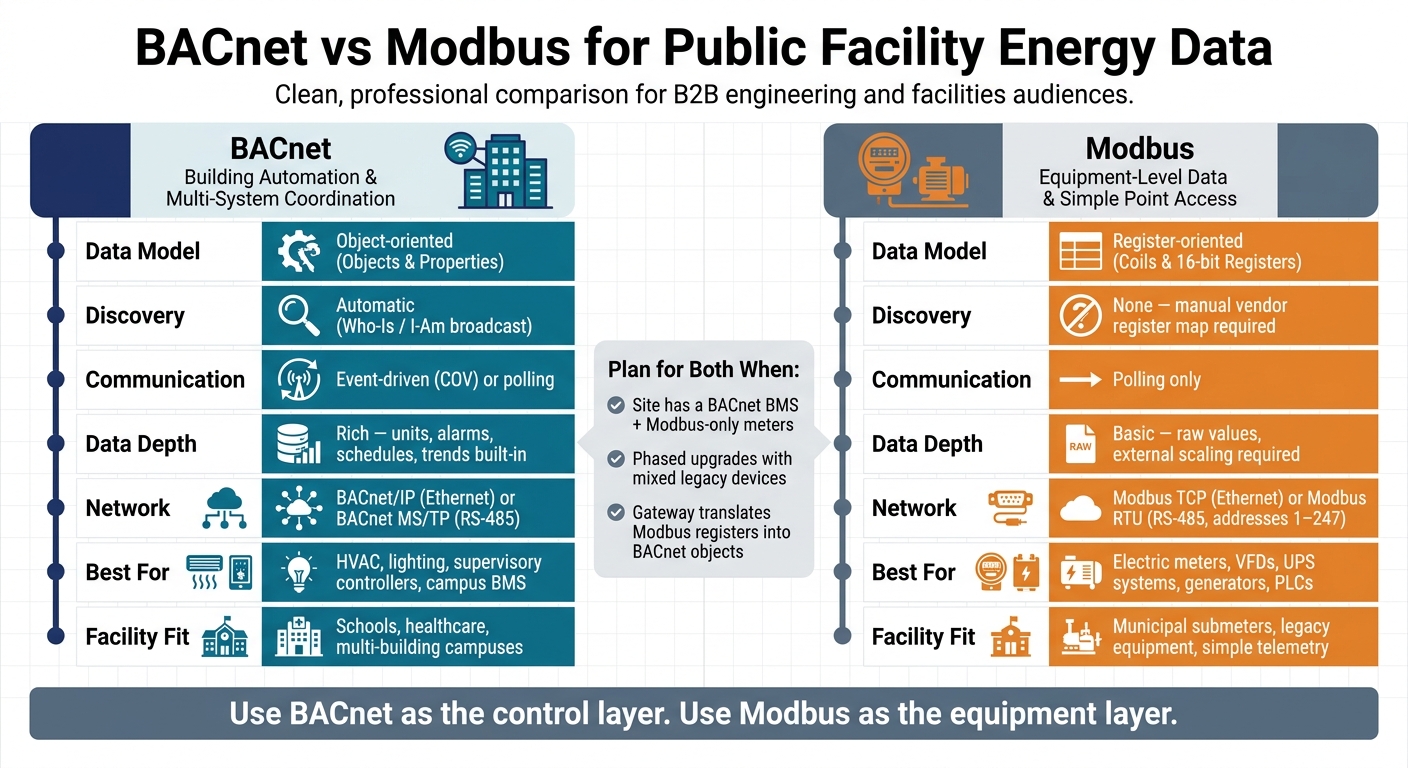
BACnet vs Modbus: Which Protocol Fits Your Public Facility?
BACnet and Modbus: What Each Protocol Does
BACnet for Building Automation and Multi-System Coordination
BACnet uses typed objects and properties, which is why it works well for coordinated HVAC, lighting, metering, scheduling, and alarms. It supports objects for points, schedules, trends, and alarms [1].
One big plus is automatic discovery. A building management system (BMS) can broadcast a Who-Is message, and devices on the network answer with I-Am, so they identify themselves without manual setup [1][3]. In a large building, that saves time fast. It matters even more when one platform needs to coordinate HVAC, lighting, meters, and alarms at the same time.
BACnet also supports Change of Value (COV) subscriptions. With COV, a device sends data only when something actually changes, which cuts network traffic [4]. If a site is running HVAC, lighting, and metering through one supervisory platform, that kind of coordination is tough to match with a simpler protocol.
Modbus for Register-Based Equipment Data
Modbus is much simpler. It moves 16-bit register values and status bits between a client and a server. It uses four basic data types: coils, discrete inputs, input registers, and holding registers [5].
That simple setup is a big reason Modbus appears on so many types of equipment, including electric meters, boilers, chillers, variable frequency drives (VFDs), generators, and UPS systems. Modbus RTU runs over serial RS-485 wiring, while Modbus TCP runs over Ethernet for newer IP-based devices.
The tradeoff is that Modbus does not explain what the data means on its own. The vendor register map defines addresses, units, and scaling [5]. So while Modbus works well for reading equipment data, it is not as strong for whole-building coordination.
| Feature | BACnet | Modbus |
|---|---|---|
| Data Model | Object-oriented (Objects & Properties) | Register-oriented (Coils & Registers) |
| Discovery | Automatic (Who-Is / I-Am) |
Manual (requires vendor register map) |
| Communication Style | Event-driven (COV) or polling | Polling only |
| Data Depth | Rich – includes units, alarms, schedules, trends | Basic – raw values, external scaling required |
| Best Use Case | Multi-system coordination (HVAC, lighting, BMS) | Equipment-level monitoring (meters, VFDs, boilers) |
Those differences show up fast when you get into network setup, gateways, and commissioning effort.
sbb-itb-034f8e1
Setup and Integration: Networks, Commissioning, and Gateways
How Network Type Affects Project Complexity
For schools, hospitals, and municipal buildings, network type has a direct effect on commissioning time and integration risk.
BACnet/IP runs on Ethernet, so it can slot into an existing IT network. BACnet MS/TP uses RS-485 serial wiring, which means trunk addressing needs close attention. Modbus TCP also runs on Ethernet. Modbus RTU uses RS-485 too, but with fixed serial settings and a client/server request/response model.
One detail can trip teams up fast: BACnet/IP discovery stops at subnet boundaries unless BBMD or Foreign Device Registration is in place.
| Protocol | Physical Layer | Addressing | Discovery |
|---|---|---|---|
| BACnet/IP | Ethernet (UDP) | IP Address + Device Instance | Automatic (Who-Is/I-Am) |
| BACnet MS/TP | RS-485 Serial | MAC Address + Device Instance | Medium (token-based) |
| Modbus TCP | Ethernet (TCP) | IP Address + Unit ID | None – manual mapping |
| Modbus RTU | RS-485 Serial | Slave ID (1–247) | None – manual mapping |
Once you pick the network, the next issue is simple: how much device data can the protocol actually expose?
When Protocol Translation Is Needed
Most public facilities don’t run on just one protocol. A school district, for example, may have a BACnet-based BMS for HVAC, but still depend on Modbus-only electric meters or fuel tank monitors.
That’s where gateways come in. In mixed sites, gateways translate Modbus register data into BACnet objects so the BMS can read it. This matters most in retrofit jobs, where older meters and controls can’t speak BACnet on their own.
The catch? Gateway setup still takes work. Teams need:
- The vendor register map
- Point mapping
- Scaling
- Word-order checks
Modbus brings extra manual mapping risk, especially around register offsets, scaling, and confusion between input and holding registers.
That setup burden is a big part of why BACnet and Modbus differ when it comes to data depth and retrofit fit.
How BMS Works with BACnet & Modbus | Building Automation Explained | IOTcenters
Device Support, Data Depth, and Retrofit Fit
After setup, the next test is simple: how much usable data do you actually get?
Where BACnet Provides Richer Building Data
BACnet’s edge comes from context, not just the fact that it connects. BACnet points carry the metadata needed to read a value the right way. That includes engineering units, status flags, descriptions, and limits, all built into each object. In HVAC, lighting, and life-safety systems, BACnet devices also expose structured data natively, with native trend, alarm, and schedule objects. That added context matters when the BMS needs to trend, alarm, and schedule points without someone manually figuring out what each value means.
Discovery also helps during phased retrofits. If that matters for your project, confirm COV support in the device documentation.
| Feature | BACnet | Modbus |
|---|---|---|
| Device Types | HVAC, lighting, supervisory controllers | Meters, VFDs, UPS systems, generators, PLCs |
| Point Naming | Discoverable (e.g., analogInput:12, presentValue) |
Raw register addresses (e.g., 40001) |
| Alarms | Native alarm objects | Manual mapping of status bits or coils |
| Status | Built-in statusFlags on every object |
Discrete inputs or bit-packed registers |
| Trends | Native trend objects | None – requires external polling and storage |
| Context | Includes units, ranges, and object purpose | Raw 16-bit values; context lives in the vendor manual |
| Interoperability | High – standardized object handling reduces integration risk | Manual – depends entirely on register map accuracy |
Where Modbus Fits Older or Equipment-Level Retrofits
Modbus works best when the job is simple point collection, not full building coordination. In public facility retrofits, it fits well when you need targeted data from equipment that’s already in place. That often means meters, VFDs, UPS systems, generators, and PLCs. Fuel monitors, UPS systems, and submeters added during energy efficiency upgrades are common examples. These devices usually expose raw points, while the BMS takes care of alarms, schedules, and trends.
If existing equipment already speaks Modbus and you only need a handful of points, it often makes sense to keep it and map it through a gateway.
This is where the split between the two protocols becomes hard to miss: retrofit scope and how much manual mapping the team has to do.
Best Fit by Facility Type and Final Recommendation
Once setup and data depth are on the table, the next step is simple: where does each protocol make the most sense?
Schools, Healthcare, and Municipal Buildings
For K–12 and higher-ed campuses, BACnet is usually the better choice at the controls layer. Schools often need centralized scheduling, shared HVAC visibility across buildings, and alarm handling that works across systems from different vendors. BACnet supports that kind of structured, discoverable data right out of the box.
Healthcare facilities also tend to lean toward BACnet because it works across different vendors while keeping point data organized and readable across HVAC, lighting, and other building systems. Modbus still has a place, but it often stays closer to the equipment level.
Municipal buildings often land in the middle and use both. A common setup is BACnet for the controls layer and Modbus for packaged equipment and submeters.
| BACnet | Modbus | |
|---|---|---|
| Retrofit Fit | Multi-system automation and campus-wide upgrades [1] | Equipment-level integration and sub-metering [2] |
| Best Use | Schools, healthcare, multi-building coordination | Municipal meters, legacy equipment, simple telemetry |
Working with a Design-Build Partner on Protocol Decisions
For public owners planning phased upgrades, protocol choices should match the project’s controls and energy goals. E3 Design-Build Contractor helps Texas public entities line up protocol decisions with energy goals, equipment selection, and long-term operations.
FAQs
Can BACnet and Modbus work together on one site?
Yes. BACnet and Modbus can work together on the same site. In most cases, they connect through multi-protocol gateways that translate data between the two.
That setup allows a building management system to read Modbus register values alongside BACnet objects. It’s a common choice in retrofits, especially when a site needs to pull data from devices like energy meters and HVAC controllers into one dashboard.
Which protocol is easier to commission in a retrofit?
BACnet is usually easier to commission in retrofit projects. Its built-in discoverability lets engineers automatically find devices on the network and browse them without a lot of manual work.
Modbus can be easier to get up and running on a small job. But it needs manual register mapping, and that gets harder to manage as the system gets bigger.
How do I choose between BACnet/IP, BACnet MS/TP, Modbus TCP, and Modbus RTU?
Choose the protocol based on the network type and the gear you need to connect:
- BACnet/IP: Best for Ethernet-based supervisory networks and workstations
- BACnet MS/TP: Used for RS-485 field-level controller trunks
- Modbus TCP: Fits IP-connected power meters, PLCs, or specialized equipment that doesn’t have native BACnet
- Modbus RTU: Common for RS-485 field devices like drives and individual sensors
Here’s the simple way to think about it: BACnet usually makes more sense for building-wide management, where many systems need to talk to each other under one umbrella. Modbus is often the better fit when you need register-based data from individual field devices.