
One third-party device can turn into one open path into your building network. If I’m buying IoT devices for a school, hospital, campus, or city building, I should treat IEC 62443 as a buying and review filter before anything gets installed.
Here’s the short version: IEC 62443 helps me check the device, the vendor, the system fit, and the installer. That matters because third-party connections have been used in major breaches, and about 20% of cyberattacks start with stolen credentials.
If I want a simple way to use the standard, I focus on four parts:
- IEC 62443-4-2 for device security features
- IEC 62443-4-1 for the vendor’s development process
- IEC 62443-3-3 for system and zone security needs
- IEC 62443-2-4 for installer and service-provider practices
I’d also check a few problem areas right away:
- Passwords and access: no default accounts, no shared logins, MFA, role-based access
- Firmware and patching: signed updates, patch plan, end-of-support dates
- Network traffic: encryption, segmentation, logging, clock sync
- Claims and proof: certification scope, firmware version, Security Level, and CISA advisories
A vendor saying “IEC 62443 compliant” is not enough. I want the exact part, tested version, Security Level, and any deployment limits in writing.
Here’s the fast view:
| What I’m checking | What I ask for |
|---|---|
| Device features | IEC 62443-4-2 evidence |
| Vendor process | IEC 62443-4-1 certificate or proof |
| System fit | Match to zone target under 3-3 |
| Installer controls | 2-4 service-provider proof |
| Known risk | CISA advisory check |
| Software parts | SBOM and patch policy |
So if I had to boil the article down to one point, it’s this: use IEC 62443 during procurement, commissioning, and day-to-day device review so I can spot weak third-party IoT devices before they become a network problem.
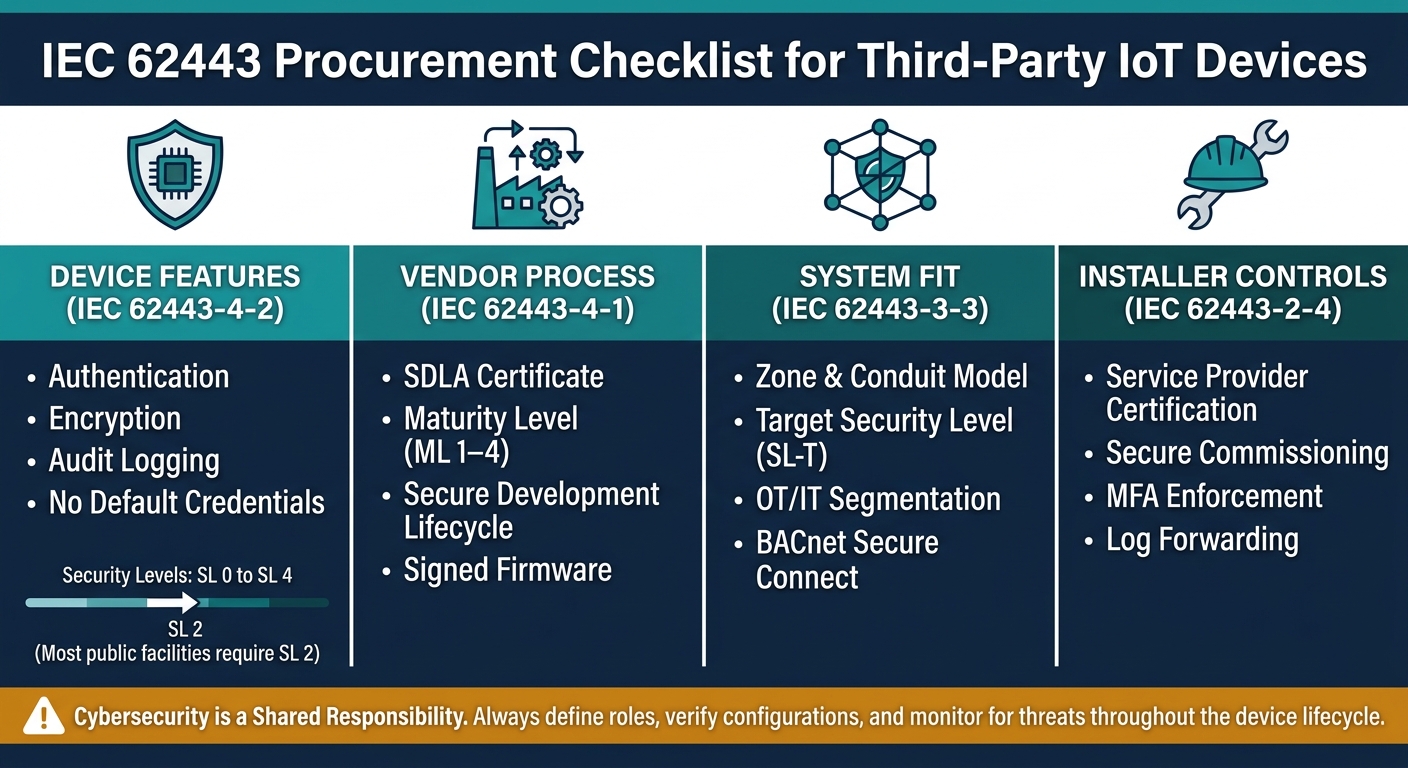
IEC 62443 Procurement Checklist for Third-Party IoT Devices
7 things you need to know about IEC 62443
sbb-itb-034f8e1
The Parts of IEC 62443 That Matter Most for Device Selection
IEC 62443 has four parts that matter most when you’re picking devices: governance, integrator practice, system security, and product security. In plain English, this standard should work as a procurement filter before any device touches your network.
The Four Parts in the Standard and Who Uses Each One
Group 1 covers general concepts and terminology. It gives owners, vendors, and integrators a shared way to talk about security.
Group 2 deals with policies and procedures. Part 2-1 covers asset-owner governance. Part 2-4 covers secure service-provider practices.
Group 3 looks at system-level requirements. Part 3-3 explains how security should work across an entire building system, not just inside one device.
Group 4 matters a lot for procurement teams. Part 4-1 looks at a vendor’s secure development process, while Part 4-2 spells out the technical security features the device itself must have.
| IEC 62443 Part | Focus Area | Primary Stakeholder |
|---|---|---|
| 2-1 | Security Program / Governance | Facility Leaders / Asset Owners |
| 2-4 | Integration & Maintenance | Service Providers / Integrators |
| 3-3 | System-wide Security | IT/OT Teams |
| 4-1 | Secure Product Development | Procurement (Vendor Vetting) |
| 4-2 | Device Technical Features | IT/OT Teams / Procurement |
Security Levels and the Seven Foundational Requirements Explained
The standard uses Security Levels (SL 0–SL 4) to show how much protection a zone or device needs.
- SL 0 means no specific requirements.
- SL 1 guards against casual or coincidental violation.
- SL 2 protects against intentional violation using simple means.
- SL 3 and SL 4 are meant for more advanced attacks that use high resources.
Many devices used in public facilities are specified at SL 2. Higher levels are usually tied to critical or safety-related zones.
Alongside those levels, IEC 62443 defines seven Foundational Requirements (FR1–FR7). Think of them as a practical checklist for reviewing any device claim:
- FR 1 – Identification and authentication control
- FR 2 – Use control
- FR 3 – System integrity
- FR 4 – Data confidentiality
- FR 5 – Restricted data flow
- FR 6 – Timely response to events
- FR 7 – Resource availability
These seven requirements map straight to the questions an IT/OT team should ask when a vendor puts a connected device in front of them for approval.
Which Clauses to Use When Reviewing Third-Party IoT Devices
Once you know the main parts, the next step is simple: match each vendor claim to the right clause.
When a vendor submits a connected device, IEC 62443-4-2 is the first place to look. It defines the technical capabilities the device must have, including authentication, encryption, and audit logging.
IEC 62443-4-1 helps you judge the vendor behind the device. It tells you whether the company’s internal development process can be trusted.
IEC 62443-3-3 zooms out to the system level. IT/OT teams use it to decide what security level a building zone needs, then check whether the proposed device can support that level inside the larger network.
There’s also a practical catch here: a device can meet 4-2 and still become a risk if the integrator falls short on 2-4. That’s why each part has a different job.
Use:
- 4-2 to screen device features
- 4-1 to screen the vendor
- 3-3 to confirm zone fit
- 2-4 to control installation and maintenance
Common Risk Areas for Third-Party IoT Devices in Public Facilities
Third-party IoT devices often open up clear security holes. IEC 62443 gives you a way to turn those holes into checks during procurement. Start here before you get into vendor review.
Weak Identity, Shared Credentials, and Poor Access Control
A lot of devices still ship with hard-coded passwords, default accounts, or static user accounts that are easy targets for automated attacks. About 20% of cyberattacks start with compromised credentials [2].
This risk maps to FR1 and FR2. Before a device gets approved, require:
- Unique credentials
- Mutual authentication
- Role-based access control
If a vendor can’t show those basics, that’s a red flag right away.
Unsigned Firmware, Weak Patching, and Insecure Updates
Unsigned updates can let malicious code slip onto a device. The trouble doesn’t stop there. Manual patching, old third-party libraries, and weak update processes all add risk.
A poor patch program leaves devices exposed long after flaws are known. In some cases, access-control devices have stayed exploitable for years after disclosure.
Map this area to FR3 and to vendor development controls under IEC 62443-4-1.
Unencrypted Traffic, Poor Segmentation, and Limited Monitoring
Plaintext traffic can be intercepted or changed in transit. That’s a big issue in facility systems that still rely on older protocols. Standard BACnet and Modbus were built for isolated networks, so they don’t include built-in encryption. BACnet Secure Connect adds encryption and certificate-based authentication [4].
Segmentation matters just as much. Without OT/IT separation, one breach can move from one connected system into other facility systems. A third-party connection can turn into a bridge from one building system to another.
Map this risk to FR4, FR5, FR6, and FR7, along with the zones-and-conduits model in IEC 62443-3-2.
Treat the table below as the procurement checklist for each device category.
| Risk Area | Specific Weaknesses | IEC 62443 Mapping |
|---|---|---|
| Identity | Hard-coded passwords, default accounts, lack of RBAC | FR1, FR2 |
| Integrity | Unsigned firmware, manual patching, vulnerable third-party code | FR3, 4-1 (Secure Development) |
| Network | Plaintext traffic, MITM vulnerability, lack of segmentation | FR4, FR5, 3-2 (Zones and Conduits) |
| Availability | Missing logs, limited event detection | FR6, FR7 |
Next, match vendor claims to the exact IEC 62443 evidence behind them.
How to Review Vendors and Check IEC 62443 Claims
Once you’ve mapped device risks to the standard, the next step is simple: make vendors back up what they say.
What Certifications and Conformity Claims Actually Prove
"IEC 62443 compliant" doesn’t tell you much on its own. You need the exact part of the standard, the Security Level, the firmware version, and the test scope.
For product-level claims on third-party IoT devices, three certification types matter most:
- SDLA under IEC 62443-4-1 shows how the product was built. It audits the vendor’s internal development and testing process, not the device itself.
- CSA under IEC 62443-4-2 looks at the device’s technical security features. The claim should state the Security Level achieved and the Foundational Requirements covered.
- SSA under IEC 62443-3-3 applies to the integrated system as a whole.
Independent certification carries more weight than a self-declaration because someone outside the company checked it. Accredited third-party certification, such as ISASecure, gives you that outside audit. A self-declaration can still be useful, but only as a starting point, not proof. Ask vendors to tie every claim to the exact standard part, level, and tested version.
How to Match Every Vendor Claim to a Specific Standard Reference
When a vendor says a device is "IEC 62443 certified", ask four questions right away:
- Which part of the standard?
- Which product model or component?
- Which Security Level (SL 1-4) or Maturity Level (ML 1-4) was achieved?
- Which firmware version and deployment assumptions were tested?
This matters because certifications are often tied to a specific version. If your RFP names firmware v2.1, but the certificate only covers v1.8, then the claim doesn’t match what you’re buying. That’s not a small gap. It’s the whole ballgame.
You should also review the "Conditions of Safe Use" in the certification report. Those conditions spell out the deployment assumptions used during testing.
In March 2024, CISA published advisory ICSA-24-065-01 on vulnerabilities in Linear eMerge E3-Series access control products. Several of those issues applied only to systems deployed outside a firewall, which is a clear reminder that certificate scope and deployment assumptions need to be checked before approval, not after rollout. [5]
That means advisory review belongs in vendor screening. Don’t wait until installation is done and then find out the risk was sitting there in plain sight.
Cross-check every vendor claim against CISA advisories before approving a device, no matter what the marketing sheet says.
A Vendor Review Checklist for Public Facility Procurement
Use the table below to turn vendor claims into written procurement requirements.
| Category | Key Question | IEC 62443 Reference |
|---|---|---|
| Secure Development | Is there an accredited SDLA certificate? Which Maturity Level (ML) was achieved? | 4-1 |
| Component Security | What Security Level (SL) is certified, and which Foundational Requirements (FRs) are covered? | 4-2 |
| Lifecycle Support | What are the patch, disclosure, and end-of-support commitments? | IEC TR 62443-2-3 |
| Credential Management | Show support for unique credentials and role-based authentication. | 4-2 |
| Encryption | Show support for encrypted data in transit and, where relevant, at rest. | 4-2 |
| Service Providers | Do third-party integrators or maintainers meet 62443-2-4? | 2-4 |
Henry Hoyne, Chief Technology Officer, Northland Controls, put it plainly:
"Update all device firmware and keep note of those that are end-of-life and no longer receiving firmware updates. You may need to put together a plan to have those devices removed and replaced." [3]
Add these questions to every RFP, and ask for written evidence, not simple checkboxes.
Applying IEC 62443 During Selection, Deployment, and Day-to-Day Operations
How to Use the Standard in Specifications and Device Selection
Start at procurement, not deployment. That’s where IEC 62443 has the most impact.
Use IEC 62443-3-2 to define zones and assign each one a target Security Level (SL-T).[1] Then require devices to meet IEC 62443-4-2 in line with the target Security Level for that zone.[1] If a vendor provides firmware or software, ask for IEC 62443-4-1 evidence to show secure development practices.[1] For deployment and maintenance, require integrators and service providers to meet IEC 62443-2-4.[1]
Your RFP should also spell out a short set of non-negotiables: no hardcoded credentials, signed updates, encrypted traffic, unique accounts, and MFA.[6][3] If firmware includes third-party or open-source code, require an SBOM so your team can check it against the NVD before approval.[6] In building automation setups, require BACnet Secure Connect.[4]
Once the spec is done, don’t stop there. Before go-live, check that the installed system actually matches what was approved.
What Deployment Teams Should Verify Before Go-Live
Selection sets the target. Commissioning proves the device meets it.
Before any device goes live, inventory each one by make, model, and firmware version, then match it against the approved spec.[3] That sounds basic, but it’s where teams often catch drift between what was bought and what was installed.
Field checks matter too. Don’t rely on diagrams alone. Verify that firewalls and VLANs are in place, unnecessary ports are closed, and the IoT zone is separated from back-end systems.[3] Confirm MFA is on, remove default credentials, and make sure logs reach the central monitor.[3] Sync device clocks as well, so monitoring and forensics line up when something goes wrong.[4]
These checks shouldn’t be a one-time gate. Use the same review steps after deployment too.
Key Takeaways for Public Facility Leaders
IEC 62443 gives public owners a clear way to assess third-party IoT devices from several angles: product, vendor, integrator, and day-to-day operations. The main areas to review are identity management, access control, firmware integrity, network segmentation, monitoring, and patch management. The standard works best when it starts in procurement specs and carries through deployment and ongoing operations, instead of being treated like a one-and-done compliance task.
On the operations side, that means keeping the asset inventory current, retiring end-of-life devices, and using IEC TR 62443-2-3 to manage patches without service disruption.[1][3] IEC 62443-2-1:2024 also adds a maturity model for program consistency.[1]
FAQs
How do I know if a device’s IEC 62443 claim is real?
Look for objective proof, not just sales talk. Ask for a third-party certification document, such as one issued through ISASecure.
If there’s no formal certificate, ask for an evidence pack instead. That should include:
- Internal audit reports
- Documented security policies
- Management review records
Also, check the certificate scope. You want to make sure it covers the specific product or service line you’re planning to buy.
What Security Level should a public facility IoT device meet?
IEC 62443 does not require one Security Level (SL) for every device. Instead, it uses a risk-based assessment to decide the right level for your facility.
In plain English: not every system needs the same level of protection. The target depends on what could happen if that system were compromised.
Asset owners usually define the target Security Level (SL-T) for specific systems or zones based on the impact of a compromise. Then, when facility teams evaluate third-party IoT devices, those requirements should be written into contracts from the start.
What should I verify before a third-party IoT device goes live?
Before a third-party IoT device goes live, check two things: security and fit. You want to know the device can work in your setup and that it lines up with IEC 62443.
Start with the vendor. Confirm they follow secure development practices, such as IEC 62443-4-1 certification. Then make sure any certificates apply to your actual deployment. A certificate on paper doesn’t help much if it doesn’t cover the way you plan to use the device.
Next, review the device’s firmware and software versions and put a patch plan in place. That means knowing what version you’re starting with, how updates will be handled, and who owns that work after deployment.
You should also document the device details, including:
- Make
- Model
- Version
On the network side, confirm the hardware sits behind a firewall. And if your system depends on open protocols, verify the device supports the ones you need, such as BACnet or Modbus.